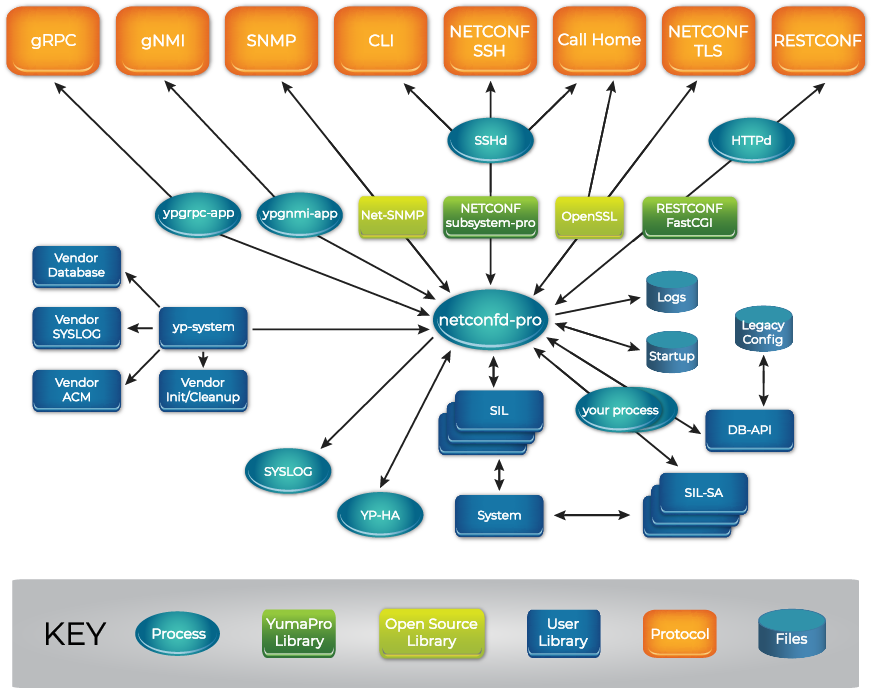
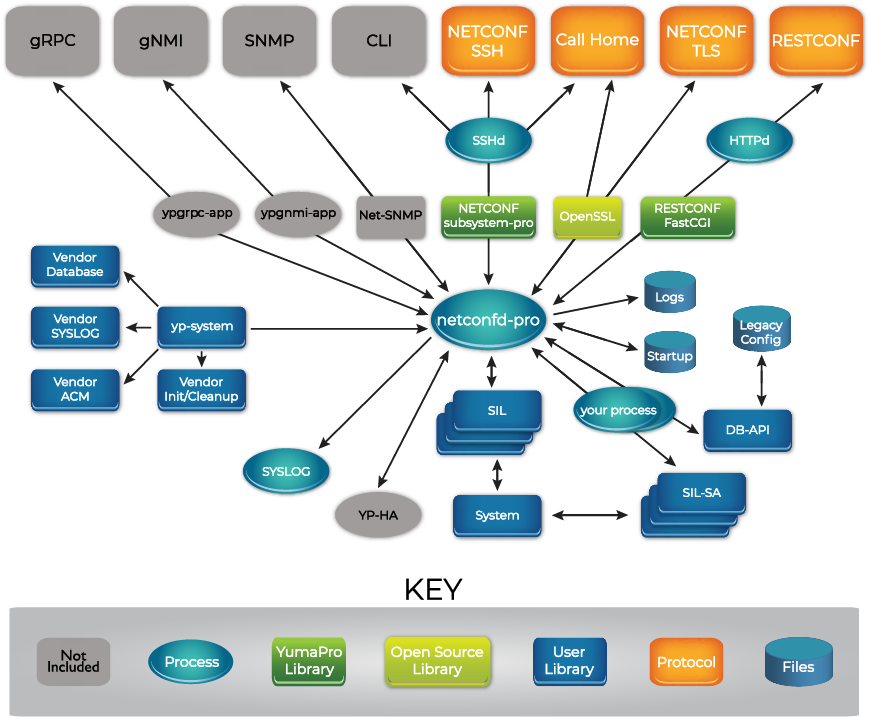
YumaWorks is a company that offers a suite of network management
and control plane automation tools, with a focus on YANG, NETCONF, and RESTCONF.
Their product YumaPro SDK
(Software Development Kit), also referred to as the
multi-protocol network management server toolkit or simply the multi-protocol server,
is a network automation management platform that provides developers a framework for developing
device management interfaces.
YumaPro SDK consists of the following components:
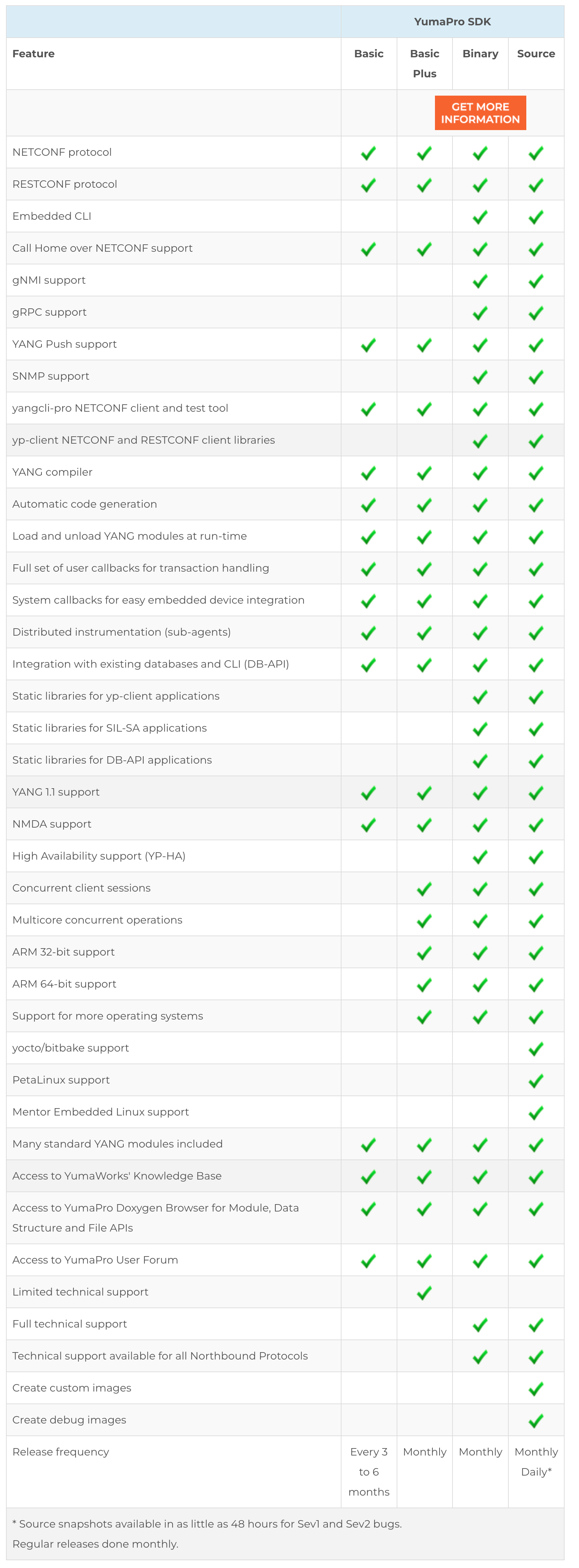
YumaPro SDK is available in binary and in source code.
YumaPro SDK Basic offers a subset of the
YumaPro SDK features and can be used for free for internal use subject to restrictions
(see the
license document
for details):
In this tutorial we will be using the basic version.
Download the YumaPro SDK Basic software and documentation from the
download page
It is available for several Linux distributions; we use Ubuntu 22.04 LTS.
As of 28 June 2023, this downloads file yumapro-sdk-basic-21.10-12.u2204.amd64.deb.
$ /usr/sbin/netconfd-pro --version

Starting netconfd-pro...
Copyright (c) 2008-2012, Andy Bierman, All Rights Reserved.
Copyright (c) 2012-2022, YumaWorks, Inc., All Rights Reserved.

netconfd-pro version 21.10-12-1fcb
Configure SSH
Edit sshd_config, for example using vi:
sudo vi /etc/ssh/sshd_config
The installation guide instructs you to add the following lines:
Port 22
Port 830
Subsystem netconf /usr/sbin/netconf-subsystem-pro
Using the following Subsystem configuration instead will allow you to view the XML messages that
are exchanged over the SSH system (this cannot easily be done with normal packet capture tools such
as Wireshark because they cannot easily decode the encrypted SSH session):
The NETCONF server will write all received XML messages to file /tmp/netconf-rx.txt and all
sent XML messages to file /tmp/netconf-tx.txt.
The multitail program is handy to monitor both files at the same time.
Install multitail:
sudo apt-get install -y multitail
Monitor both files at the same time using different colors:
multitail -ci magenta /tmp/netconf-rx.txt -ci green /tmp/netconf-tx.txt
Press F1 to get help on the interactive keys that multitail supports. Some handy keys are B to
scroll back and N to clear the window.
Configure SSH
TODO: Are we actually using a key? It seems that we are using username/password below.
Use ssh-keygen to generate a public-private key pair (accept defaults for all prompts):
$ ssh-keygen -t ed25519
Generating public/private ed25519 key pair.
Enter file in which to save the key (/home/ubuntu/.ssh/id_ed25519):
Enter passphrase (empty for no passphrase):
Enter same passphrase again:
Your identification has been saved in /home/ubuntu/.ssh/id_ed25519
Your public key has been saved in /home/ubuntu/.ssh/id_ed25519.pub
The key fingerprint is:
SHA256:e59bSBR6oP/pO+NjJwauL9S1cXQ+8pLa6vPLvLGsoD8 ubuntu@ip-172-31-28-171
The key's randomart image is:
+--[ED25519 256]--+
|          . .    |
|         . o .. .|
|        . . o. o |
|         . oo....|
|        S....++ .|
|        ..oo.= . |
|       ..o..*.o  |
|        oEo=@++  |
|       .o=+B%^o  |
+----[SHA256]-----+
Restart SSH to make the keys take effect:
sudo service ssh restart
Set a password
For this demo, we will be using username and password authentication.
If you are using an AWS Ubuntu instance, user ubuntu does not have a password by default.
Set a password as follows:
$ sudo su -
$ passwd ubuntu
New password: topsecret
Retype new password: topsecret
passwd: password updated successfully
Start the NETCONF server
Start the netconfd-pro server (with maximum debug logging; use debug instead of debug4 to
reduce the verbosity):
$ netconfd-pro --log-level=debug4 --access-control=off

Starting netconfd-pro...
Copyright (c) 2008-2012, Andy Bierman, All Rights Reserved.
Copyright (c) 2012-2022, YumaWorks, Inc., All Rights Reserved.

...lots of output...

netconfd-pro init OK, ready for sessions

Running netconfd-pro server (21.10-12-1fcb)

Binding to AF_LOCAL socket /tmp/ncxserver.sock

agt_ncxserver: listen ncxsock fd: 3
Start the command line interface (CLI) client
In a separate Terminal window, start the yangcli-pro client:
$ yangcli-pro

  yangcli-pro version 21.10-12
  libssh2 version 1.8.0

  Copyright (c) 2008-2012, Andy Bierman, All Rights Reserved.
  Copyright (c) 2012-2022, YumaWorks, Inc., All Rights Reserved.

...more output...

parallels@localhost>
Connect the CLI client to the NETCONF server
Enter the following command in the CLI to connect to the server
(use your Linux username and password, and put the password in quotes if it contains a question mark):
parallels@localhost> connect server=localhost user=<username> password=<password></b>
NETCONF 1.1 session established for parallels on localhost
Client Session Id: 1
Server Session Id: 4
...more output...
Protocol version set to: RFC 6241 (base:1.1)
Default target set to:
Save operation mapped to: commit
Default with-defaults behavior: explicit
Additional with-defaults behavior: trim,report-all,report-all-tagged
YANG library set to: 1.0 (RFC 7895)
module-set-id: 4269
</pre>
## View the NETCONF messages
In the `multitail` window that we had started in an earlier step, we can see the NETCONF messages
that are being exchanged between the NETCONF client and server.
The client sends a `hello`:
```xml
urn:ietf:params:netconf:base:1.0urn:ietf:params:netconf:base:1.1
```
Note: throughout these examples, we have used the `xmllint` program to pretty-print the XML in
the NETCONF messages. One side-effect of this is that the XML elements and attributes may appear
in a different order.
The server responds with a `hello`:
```xml
urn:ietf:params:netconf:base:1.0urn:ietf:params:netconf:base:1.1urn:ietf:params:netconf:capability:candidate:1.0urn:ietf:params:netconf:capability:confirmed-commit:1.0urn:ietf:params:netconf:capability:confirmed-commit:1.1urn:ietf:params:netconf:capability:rollback-on-error:1.0urn:ietf:params:netconf:capability:validate:1.0urn:ietf:params:netconf:capability:validate:1.1urn:ietf:params:netconf:capability:url:1.0?scheme=fileurn:ietf:params:netconf:capability:xpath:1.0urn:ietf:params:netconf:capability:notification:1.0urn:ietf:params:netconf:capability:interleave:1.0urn:ietf:params:netconf:capability:partial-lock:1.0urn:ietf:params:netconf:capability:with-defaults:1.0?basic-mode=explicit&also-supported=trim,report-all,report-all-taggedurn:yumaworks:params:xml:ns:netconf:config-id?id=13urn:ietf:params:xml:ns:netconf:base:1.0?module=ietf-netconf&revision=2011-06-01&features=candidate,confirmed-commit,rollback-on-error,validate,url,xpathurn:ietf:params:xml:ns:yang:iana-crypt-hash?module=iana-crypt-hash&revision=2014-08-06&features=crypt-hash-md5,crypt-hash-sha-256,crypt-hash-sha-512urn:ietf:params:xml:ns:yang:ietf-inet-types?module=ietf-inet-types&revision=2013-07-15urn:ietf:params:xml:ns:yang:ietf-netconf-acm?module=ietf-netconf-acm&revision=2018-02-14
...
http://yumaworks.com/ns/yumaworks-types?module=yumaworks-types&revision=2021-05-15urn:ietf:params:netconf:capability:yang-library:1.0?revision=2016-06-21&module-set-id=42695
```
The client issues a `get` filtering on subtree `ietf-yang-library`
to retrieve the details of the modules that the server supports
(see [RFC8525](https://datatracker.ietf.org/doc/rfc8525/) for details)
(output truncated):
```xml
```
The server responds with the requested information (output truncated):
```xml
4269ietf-netconf2011-06-01urn:ietf:params:xml:ns:netconf:base:1.0candidateconfirmed-commitrollback-on-errorvalidateurlxpathimplementiana-crypt-hash2014-08-06http://localhost/restconf/yang/iana-crypt-hash/2014-08-06urn:ietf:params:xml:ns:yang:iana-crypt-hashcrypt-hash-md5crypt-hash-sha-256crypt-hash-sha-512implementietf-inet-types2013-07-15http://localhost/restconf/yang/ietf-inet-types/2013-07-15urn:ietf:params:xml:ns:yang:ietf-inet-typesimportietf-netconf-acm2018-02-14http://localhost/restconf/yang/ietf-netconf-acm/2018-02-14urn:ietf:params:xml:ns:yang:ietf-netconf-acmimplement
...
yumaworks-types2021-05-15http://localhost/restconf/yang/yumaworks-types/2021-05-15http://yumaworks.com/ns/yumaworks-typesimport
```
## Issue a command in the CLI client
In the CLI client, the `show modules` command can be used to view the YANG modules that the
server reports:
## Retrieve the (empty) configuration
In the CLI client, issue a `get-config` command to retrieve the running configuration:
parallels@localhost> get-config source=running
RPC Data Reply 10 for session 4 [default]:
rpc-reply {
data {
}
}
In this example, there is no configuration yet (we will add some configuration below).
The client sends a `get-config`:
```xml
</source>
```
The server responds with the requested configuration:
```xml
```
## Retrieve a subtree of the operational state
In the CLI client, issue an `sget` command to retrieve operational state for the
`/netconf-state/sessions` subtree of the operational state tree (use `/` if you want to see the
whole tree):
The client sends a `get` with the filter for the subtree:
```xml
```
The server responds with the requested operational state:
```xml
5ncm:netconf-sshparallels127.0.0.12022-09-09T15:07:13Z2000
```
## Retrieve the YANG schema for a module
In the CLI client, issue the `get-schema` command to retrieve the YANG schema for a specific
module from the server:
parallels@localhost> get-schema identifier=ietf-netconf-notifications
RPC Data Reply 10 for session 5 [default]:
rpc-reply {
data '
module ietf-netconf-notifications {
namespace
"urn:ietf:params:xml:ns:yang:ietf-netconf-notifications";
prefix ncn;
import ietf-inet-types { prefix inet; }
import ietf-netconf { prefix nc; }
organization
"IETF NETCONF (Network Configuration Protocol) Working Group";
contact
"WG Web: <http://tools.ietf.org/wg/netconf/>
WG List: <mailto:netconf@ietf.org>
WG Chair: Bert Wijnen
<mailto:bertietf@bwijnen.net>
WG Chair: Mehmet Ersue
<mailto:mehmet.ersue@nsn.com>
Editor: Andy Bierman
<mailto:andy@netconfcentral.org>";
description
"This module defines a YANG data model for use with the
NETCONF protocol that allows the NETCONF client to
receive common NETCONF base event notifications.
Copyright (c) 2012 IETF Trust and the persons identified as
the document authors. All rights reserved.
Redistribution and use in source and binary forms, with or
without modification, is permitted pursuant to, and subject
to the license terms contained in, the Simplified BSD License
set forth in Section 4.c of the IETF Trust's Legal Provisions
Relating to IETF Documents
(http://trustee.ietf.org/license-info).
This version of this YANG module is part of RFC 6470; see
the RFC itself for full legal notices.";
revision "2012-02-06" {
description
"Initial version. Errata 3957 added.";
reference
"RFC 6470: NETCONF Base Notifications";
}
grouping common-session-parms {
description
"Common session parameters to identify a
management session.";
leaf username {
type string;
mandatory true;
description
"Name of the user for the session.";
}
leaf session-id {
type nc:session-id-or-zero-type;
mandatory true;
description
"Identifier of the session.
A NETCONF session MUST be identified by a non-zero value.
A non-NETCONF session MAY be identified by the value zero.";
}
...
leaf timeout {
when
"../confirm-event = 'start' or ../confirm-event = 'extend'";
type uint32;
units "seconds";
description
"The configured timeout value if the event type
is 'start' or 'extend'. This value represents
the approximate number of seconds from the event
time when the 'timeout' event might occur.";
}
} // notification netconf-confirmed-commit
}
'
}
The client sends a `get-schema` for the module:
```xml
ietf-netconf-notifications
```
The server responds with the requested schema:
```xml
module ietf-netconf-notifications {
namespace
"urn:ietf:params:xml:ns:yang:ietf-netconf-notifications";
prefix ncn;
import ietf-inet-types { prefix inet; }
import ietf-netconf { prefix nc; }
organization
"IETF NETCONF (Network Configuration Protocol) Working Group";
contact
"WG Web: <http://tools.ietf.org/wg/netconf/>
WG List: <mailto:netconf@ietf.org>
WG Chair: Bert Wijnen
<mailto:bertietf@bwijnen.net>
WG Chair: Mehmet Ersue
<mailto:mehmet.ersue@nsn.com>
Editor: Andy Bierman
<mailto:andy@netconfcentral.org>";
description
"This module defines a YANG data model for use with the
NETCONF protocol that allows the NETCONF client to
receive common NETCONF base event notifications.
Copyright (c) 2012 IETF Trust and the persons identified as
the document authors. All rights reserved.
Redistribution and use in source and binary forms, with or
without modification, is permitted pursuant to, and subject
to the license terms contained in, the Simplified BSD License
set forth in Section 4.c of the IETF Trust's Legal Provisions
Relating to IETF Documents
(http://trustee.ietf.org/license-info).
This version of this YANG module is part of RFC 6470; see
the RFC itself for full legal notices.";
revision "2012-02-06" {
description
"Initial version. Errata 3957 added.";
reference
"RFC 6470: NETCONF Base Notifications";
}
grouping common-session-parms {
description
"Common session parameters to identify a
management session.";
leaf username {
type string;
mandatory true;
description
"Name of the user for the session.";
}
leaf session-id {
type nc:session-id-or-zero-type;
mandatory true;
description
"Identifier of the session.
A NETCONF session MUST be identified by a non-zero value.
A non-NETCONF session MAY be identified by the value zero.";
}
...
leaf timeout {
when
"../confirm-event = 'start' or ../confirm-event = 'extend'";
type uint32;
units "seconds";
description
"The configured timeout value if the event type
is 'start' or 'extend'. This value represents
the approximate number of seconds from the event
time when the 'timeout' event might occur.";
}
} // notification netconf-confirmed-commit
}
```
## Exit from the CLI client
Exit from the CLI client:
parallels@localhost> quit
## Adding a plugin for your own data model
We will now add a plugin for our example YANG data model: [interfaces.yang](/yang-tutorial/interfaces.yang),
following the instructions in the
[YumaPro Developer Manual](https://www.yumaworks.com/pub/latest/dev/yumapro-dev-manual.html)
.
If you haven't already done so, clone the `yang-tutorial` repo:
$ cd ~
$ git clone https://github.com/brunorijsman/yang-tutorial.git
By default YumaPro SDK expects the YANG data models to be installed in `~/modules`.
Copy the example YANG data model [interfaces.yang](/yang-tutorial/interfaces.yang) into `~/modules`:
$ mkdir ~/modules
$ cd ~/modules
$ cp ~/yang-tutorial/interfaces.yang .
YumaPro SDK support a few different flavors of plugins.
We will use the SIL flavor, which is dynamically linked into the NETCONF server and which uses
synchronous callbacks.
We will put our plugin code in the `~/plugins` directory:
$ mkdir ~/plugins
$ cd ~/plugins
Run the YumaWorks `make_sil_dir_pro` script to generate the C stub code from the YANG data model:
The files starting with `u_` (for user) can be edited to customize the behavior of the plugin.
We will edit the stub C code that YumaPro SDK generated to provide values for the operational
state attributes.
There are many other callbacks that can be edited in the stub code, for example to do something
when an interface is added or removed, when an IPv4 address is set, changed, or removed, etc.
For a complete list of all the callbacks that can be customized see the
[YumaPro Developers Manual](https://www.yumaworks.com/pub/latest/dev/yumapro-dev-manual.html#)
.
For now, we will keep it as simple as possible and only implement the callback for providing packet
counter values.
Edit the generated stub file `u_interfaces.c`:
$ vi ~/plugins/interfaces/src/u_interfaces.c
Edit function `u_intf_sent_packets_get`:
```c
status_t u_intf_sent_packets_get (
getcb_get2_t *get2cb,
const xmlChar *k_intf_name)
{
...
}
```
Change the following lines:
```c
/* check if the requested node exists; determined by the
* SIL or SIL-SA callback based on instances in the system
* CHANGE node_exists TO TRUE WHEN VALUE CODE FILLED IN */
boolean node_exists = FALSE;
if (!node_exists) {
return ERR_NCX_NO_INSTANCE;
}
obj_template_t *obj = GETCB_GET2_OBJ(get2cb);
status_t res = NO_ERR;
/* get the real value from the system somehow */
uint64 v_sent_packets = 0;
```
Into the following lines (to keep things as simple as possible, we return a random value for the
number of sent packets counter):
```c
/* check if the requested node exists; determined by the
* SIL or SIL-SA callback based on instances in the system
* CHANGE node_exists TO TRUE WHEN VALUE CODE FILLED IN */
boolean node_exists = TRUE; // <<< Changed this line
if (!node_exists) {
return ERR_NCX_NO_INSTANCE;
}
obj_template_t *obj = GETCB_GET2_OBJ(get2cb);
status_t res = NO_ERR;
/* get the real value from the system somehow */
uint64 v_sent_packets = rand() % 1000; // <<< Changed this line
```
Make a similar change in the function `u_intf_received_packets_get`:
```c
/* check if the requested node exists; determined by the
* SIL or SIL-SA callback based on instances in the system
* CHANGE node_exists TO TRUE WHEN VALUE CODE FILLED IN */
boolean node_exists = TRUE;
if (!node_exists) {
return ERR_NCX_NO_INSTANCE;
}
obj_template_t *obj = GETCB_GET2_OBJ(get2cb);
status_t res = NO_ERR;
/* get the real value from the system somehow */
uint64 v_received_packets = rand() % 1000;
```
Save the changes.
Build and install the plugin (the `make` step generates some warnings about unused parameters
which you can ignore for now):
$ cd interfaces
$ make
$ sudo make install
Go back to the CLI client which we started earlier in this tutorial and issue the following
command to instruct the NETCONF server to load the new YANG module:
parallels@localhost> load interfaces
RPC Data Reply 5 for session 4 [default]:
rpc-reply {
mod-revision 2022-03-12
}
We separate need to load the YANG module into the CLI client:
parallels@localhost> mgrload interfaces
Load module 'interfaces' OK
Note: instead of issuing CLI commands to load the YANG module into the server and the client, we
can also start the server with a `--module` command line option: